
Printronix: Unpause your printer
Printers will not print or calibrate if they're paused. Depending on the model of your printer, you'll see different indicators if the printer is paused.
How to tell if your printer is paused
T800: "OFFLINE" in top-right corner
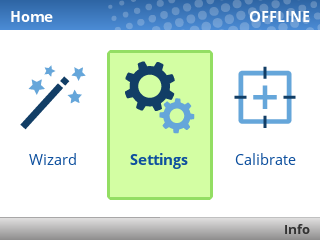
The OFFLINE text means the printer is paused. Unpause it using the green pause button [ I I ] below the screen. If prompted to save settings, choose Save Permanently in Active Config. You should then see ONLINE in the top-right corner of the screen, meaning the printer is ready.
ZD621R: Pause indicator above screen

If the PAUSE light is lit up yellow, the printer is paused. Unpause it using the Pause button [ I I ] to the right of the screen.
ZD500R: PRINTER PAUSED message flashing on screen
If the printer's screen flashes PRINTER PAUSED, unpause it using the Pause button [ I I ] to the right of the screen.