
Submitting Label Servicing Jobs
The following article describes the process for submitting Label Servicing Jobs to be printed by Simple RFID and shipped to you.
2026 Label Servicing Program Pricing
Simple, predictable pricing for every label servicing job. Each job includes a base fee, label costs, and a per-label surcharge based on quantity.
What’s Included in Every Servicing Job
Your order includes full professional print preparation and quality checks:
- Job Setup – We configure your print job and verify all specifications before production. • Proofing – A digital proof is sent for review and approval before printing.
- EPC Encoding Verification – Each label’s EPC is validated for accuracy.
- Barcode Scan Check – All barcodes are scanned to ensure readability.
- Organizing & Packing – Labels are neatly organized, packaged, and prepared for shipment.
Example Calculation: For a Label Servicing order of 5,000 hangtags, the total cost would be: Cost of Tags: $600 (5,000 x $0.12ea) Base Job Fee: $250 (2nd Tier range 1,0001 - 10,000) Surcharge: $450 (5,000 x $0.09) = $1300 Total
Terms & Details
Per Job Basis: Pricing is calculated per job, usually based on the shipping destination.
Multiple Shipping Locations: Each destination is treated as a separate job with its own base fee and surcharges.
Label Costs: Material, size, and quantity affect label cost and are billed in addition to servicing fees.
Turnaround Time: Provided at order confirmation. Custom or Large Jobs: Orders over 100,000 labels or requiring custom materials may require a separate quote.
Rush Jobs: Any jobs under 1 week turnaround time will be assessed a 25% surcharge on the total price.
Turnaround Time: Provided at order confirmation. Custom or Large Jobs: Orders over 100,000 labels or requiring custom materials may require a separate quote.
Submit Label Servicing Jobs in the Simple RFID Portal
Follow the steps below to submit a label servicing request:
1. Add Simple RFID Label Servicing as a Supplier
2. Create Your Purchase Order
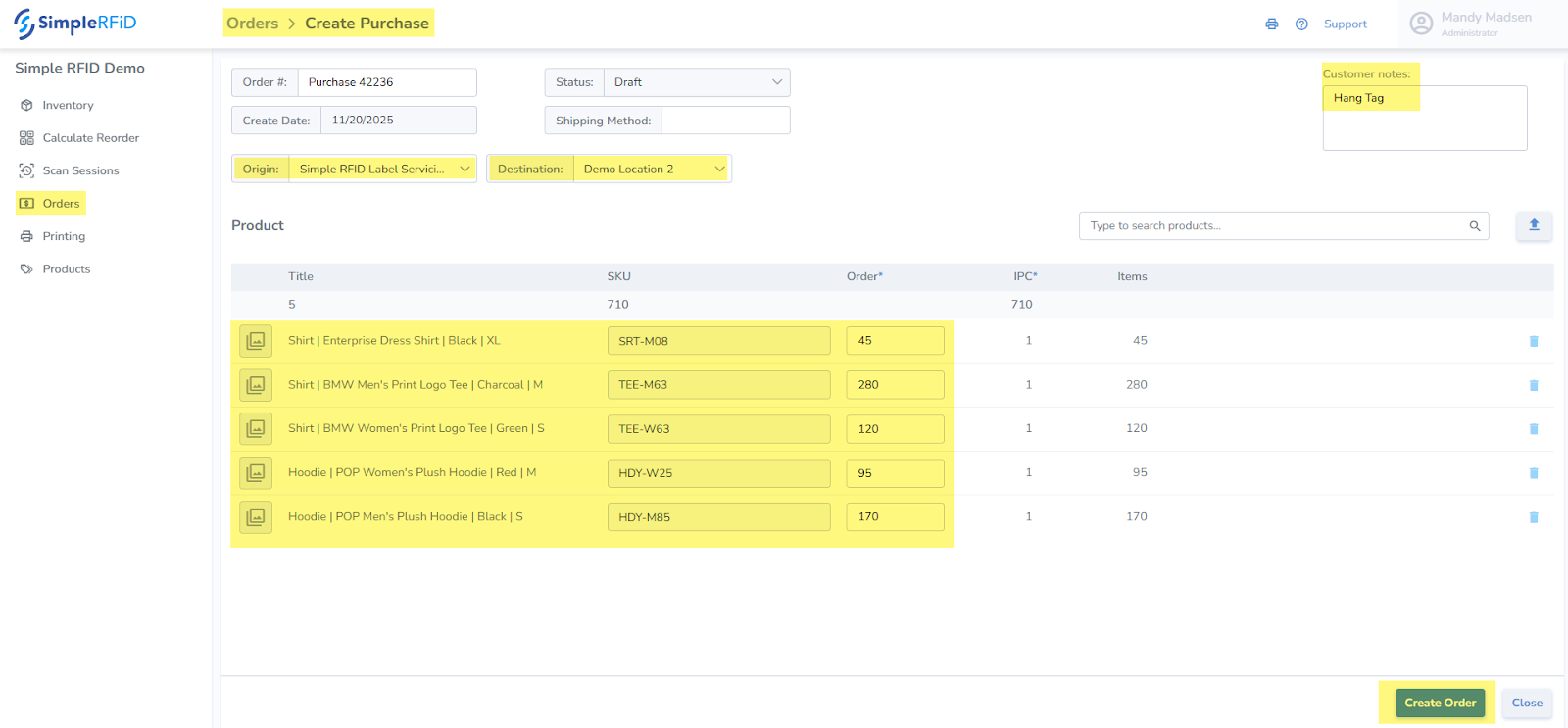
- From the Orders page, click the plus button (top right) to create a new order, then select "Purchase" as the type
- Select Simple RFID Label Servicing as the Origin.
- Select your desired Ship-To Location as the Destination.
- In the Customer Notes field (top right), enter the desired label type.
- Add the products and quantities.
- If you wish to add any tag/serial level properties (such as Lot #, Cost, Serial Number, etc.) you may add them at this stage by clicking the row.
- Click Create Order (bottom right).
3. Update Order Status
- Open the newly created order.
- Change the status from Draft → Shipping.
4. Notify Simple RFID
Once your order is submitted, email servicing@simplerfid.com to let our team know you’ve created a new label servicing request.
Create Simple RFID Label Servicing Profile
This form provides Simple RFID with projections, label type needed, GS1 requirements, etc. This provides you with the Terms & Conditions of the Simple RFID Label Servicing Agreement, and includes pricing & contracts.
Create Destination Location
Create the Location in Simple RFID where you wish to have the labels shipped. This is the default location.
Create Products
Ensure that all products are entered into Simple RFID.
If the Products need to be created as GS1 labels ensure that the Company Prefix matches, and the proper Barcode is entered into the GTIN & Barcode fields.
Create Purchase Order
- Create Purchase Order in Simple RFID and select Simple RFID Service Bureau as the Origin.
- Update the Order to Shipping status.
Tracking Job Status
As the jobs are printed you will have visibility into the jobs, just as if you printed them yourself.
Additionally, we verify all label encoding to ensure that all labels scan accurate & complete.
Once the Job is moved to Completed you will receive Tracking as soon as the job ships.
Please expect 2 week timelines for standard jobs.