
Create Audit, Scan & Identify Mismatches
All Audits View
The Audit page in the Simple RFID Web Portal serves to create, manage, and review inventory audits.
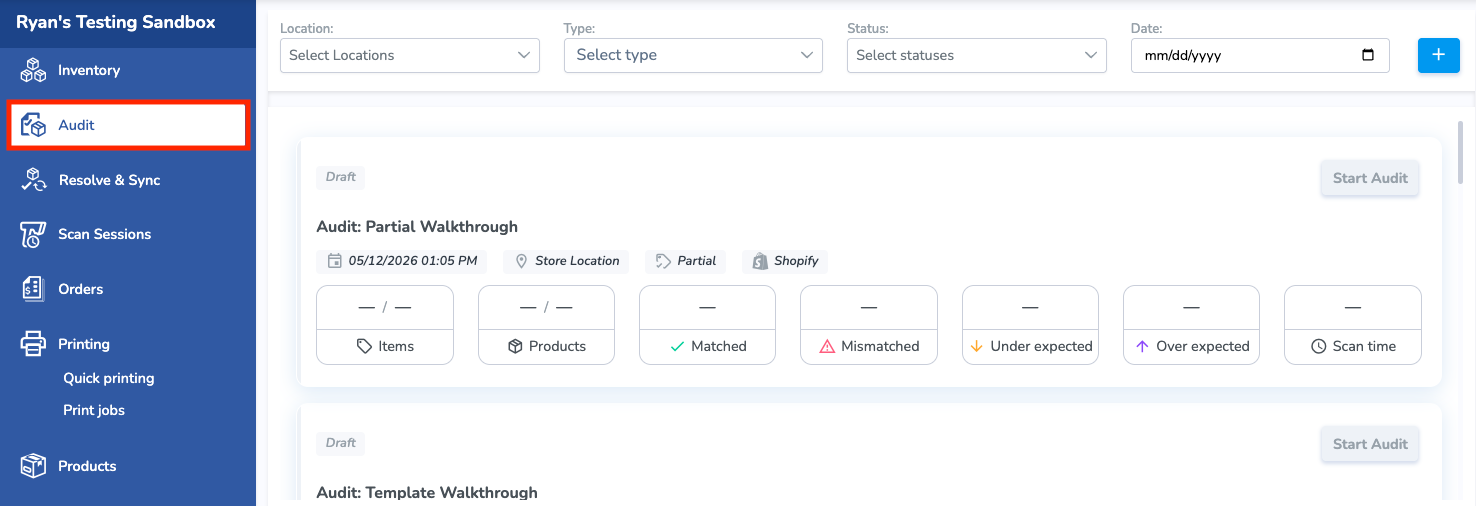
To access the page, select Audit from the left navigation menu.
The Audit page displays a list of all Audits. Click any Audit to view its details, progress, and results.
Use the top filters to quickly locate an Audit:
- Location – Filter by inventory location.
- Type – View Full, Partial, or Template Audits.
- Status – Filter by the Audit's current status, such as Draft, Open, or Completed.
- Date – Display Audits created or performed within a specific date range.
To create a new Audit, click the blue + (plus) button in the upper-right corner of the page.
Create a New Audit
You can also create an Audit from the Mobile App
From the Create New Audit pop-up window, enter the Name of the Audit, the Source of the comparison, the Location where the audit is being conducted, and the Products being audited:
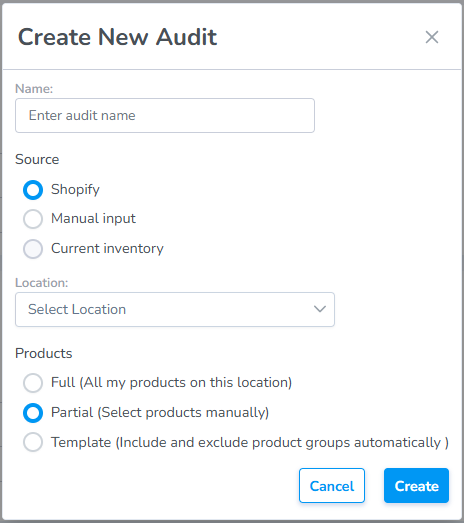
Name:
- This is a free text field to name the audit anything you choose. If you choose to keep this field blank the system will auto-generate an Audit Name for you.
Source:
- for the Source you'll choose Manual Input: This allows the user to use their own Custom Source such as a spreadsheet
Location:
- Choose the location where the audit is being conducted
Products:
- The Products radio select will default to Partial since without an integration the system doesn't know how much or what part of the inventory is being audited.
Click "Create" to create
- The Audit will be created in Draft status.