
Printronix: Change Interface
The Interface setting determines which interface the printer will be listening for print jobs on. It's important to have this set correctly, or your printer won't accept print jobs and may not even be detected by the Print Client.
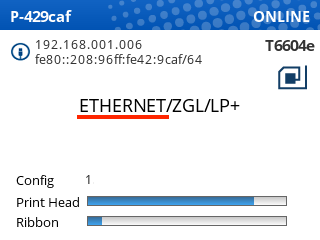
The current interface will show on the printer's Online screen:
Changing the Interface setting
- First, pause your printer.
- Open Settings
- Navigate to Host I/O > Control
- Press Enter to edit the Interface setting
- If you see ENTER SWITCH LOCKED, follow these steps: ENTER SWITCH LOCKED
- Use the up/down arrow keys to scroll to Ethernet or USB depending on how the printer is connected
- Press Enter to select the correct setting
- Unpause the printer, and choose Save Permanently in Active Config.
The printer should now display the correct interface.