
Shopify: Compare & Sync
InstructionsThe forfollowing article describes the Shopifyprocess of comparing and syncing your Simple RFID inventory to Shopify.
Comparing
On the Simple RFID app includingin configuring,Shopify, printing,navigate comparingto &the verifying orders
Compare On Hand
How to verify accuracy of product quantities on Shopify after performing an inventory audit, as well as fix/update discrepancies
Perform an auditatpage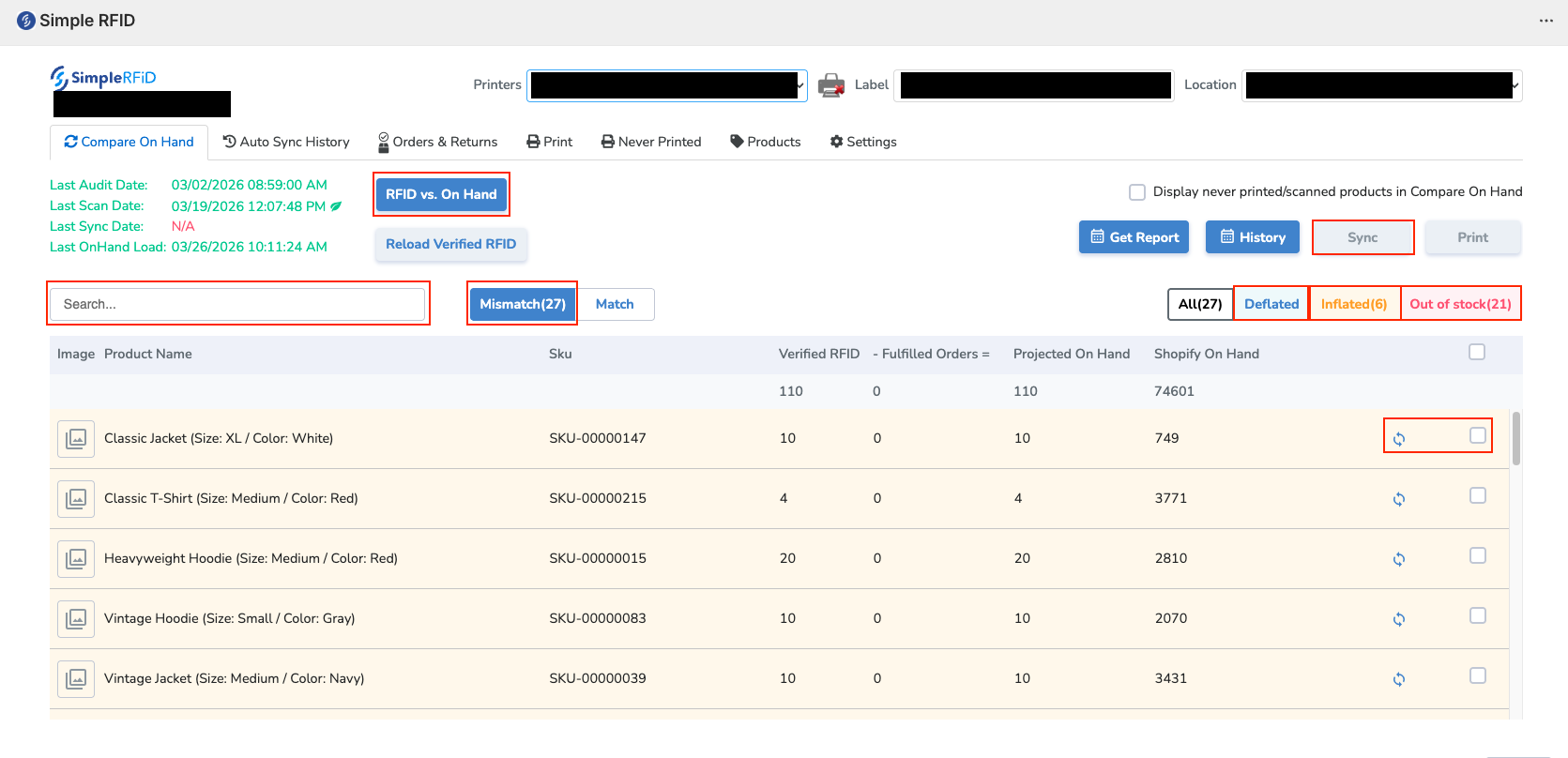
To
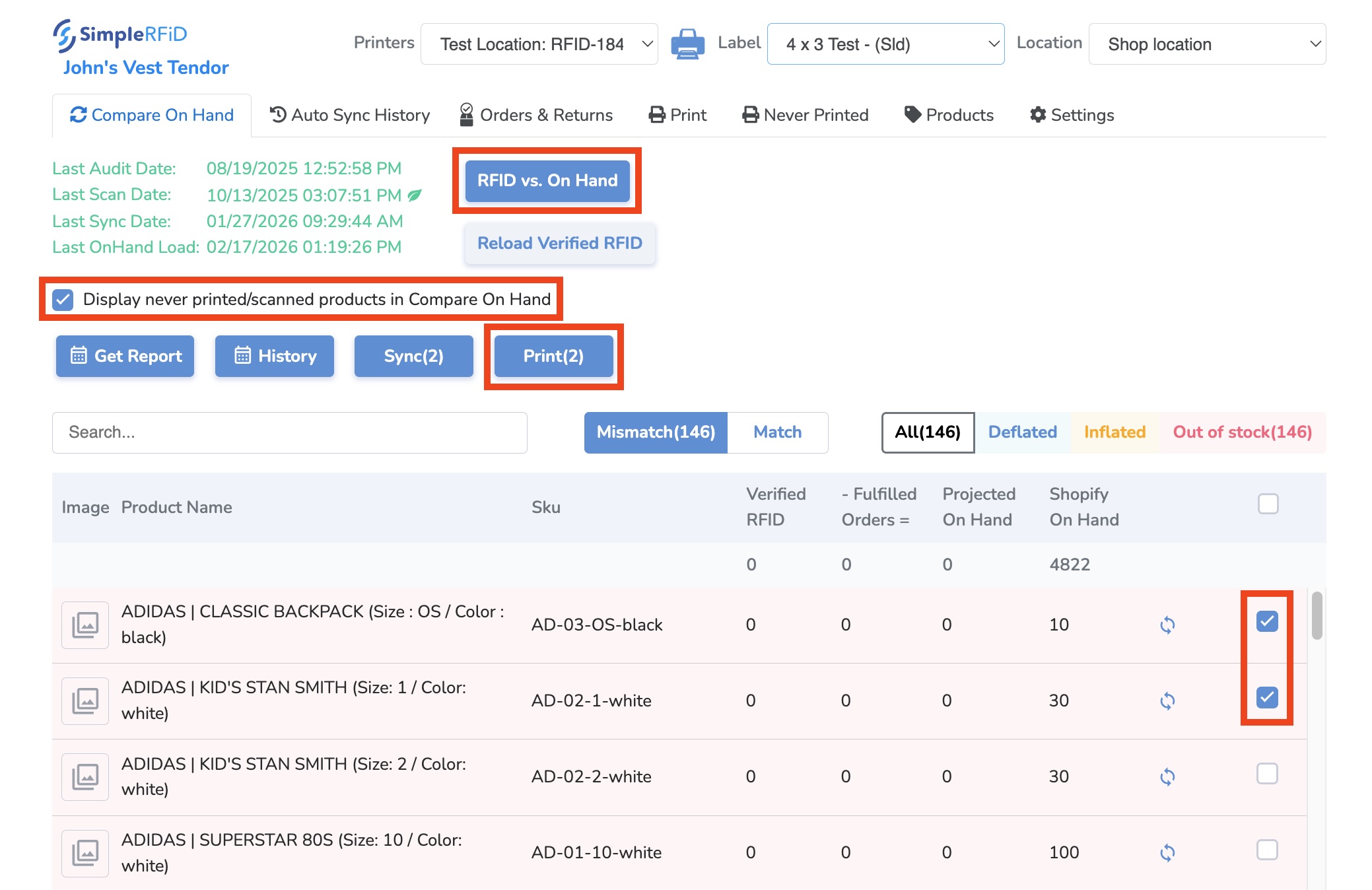
theloadselectedyourlocation to ensure that item quantities are up to date.Using the Location dropdown in the top right,inventory, selectthe desired locationClick "RFID vs. OnHand" to load the resultsSearch for product to verify.- Hand
If you
don'can'tseefindtheaproductproduct, it may be due to the item never being printed and/or scanned. If this is thecasecase, click the "Display never printed/scanned products in Compare On Hand" checkbox,thenand reload the page.
- Hand
ReviewOnce
theyourMismatchedinventoryitemsisandloaded,determine:Deflatedyou-willHaveseetheeachitemsproductbeenwithaddedatofewShopify?differentArequantities:Verified
theRFIDThe
itemsquantitytransferringinfromyouranotherSimplelocation?InflatedRFID-inventoryFulfilled
AreOrdersThe
all items tagged? Is something missing?Outquantity ofStock - Are all items tagged? Is something missing?
Make Corrections for any Mismatched items
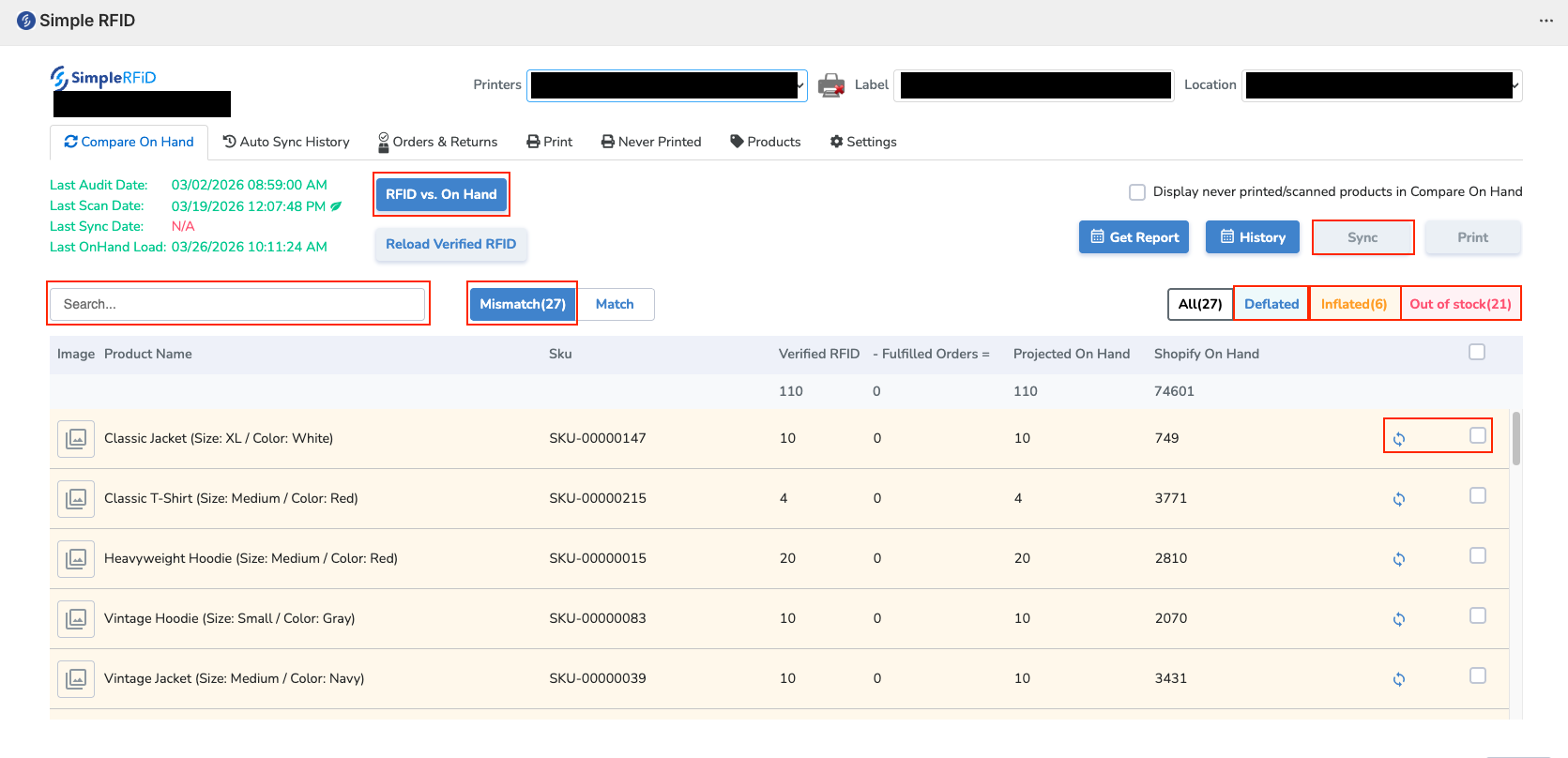
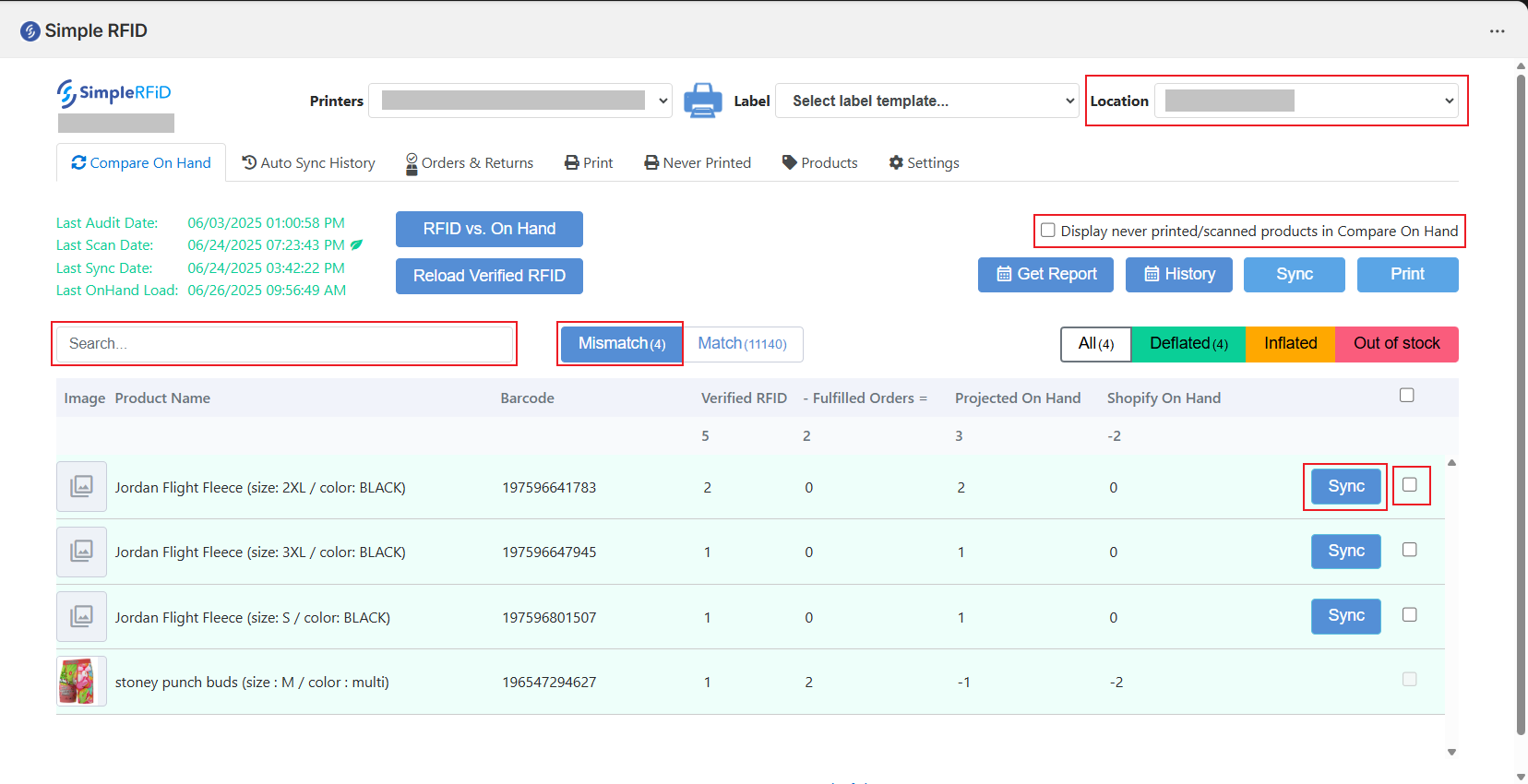
The Verified RFID column reflects the number of tags scanned for this particular item in the most recent audit.The Orders column reflects anyorders fulfilledorders in Shopify for this itemsince the lastsync.auditTheProjected On Hand
The
columndifferenceshowsbetween Verified RFID and Fulfilled Orders, showing the numberof itemsthatarewillremaining.Thisbeissyncedthentocompared against theShopifyShopify On Hand
The
quantities.
The Mismatch section will show every product that is mismatched between Simple RFID and Shopify
There are three possible types of mismatches:
Deflated
SyncProjected PermissionsOn Hand is higher than Shopify
Inflated
Projected On Hand is lower than Shopify
Out of stock
Projected On Hand is zero
Non-managerAfter usersverifying canthat bea restrictedproduct from performing inventory syncs. To enable this feature:

Non-managerthe accountsfar right of each product, there is a checkbox. Selecting this will beadd ableit to see the comparesync onlist. hand page, but will be unable toTo sync the results.
Adjustmentproducts, History
Spot check quantities by going toclick the ShopifySync products tab, selecting the product in question, and scrolling down to the inventory section. Add the committed and available for that location. The quantity is accurate if the total equals the number in the RFID quantity.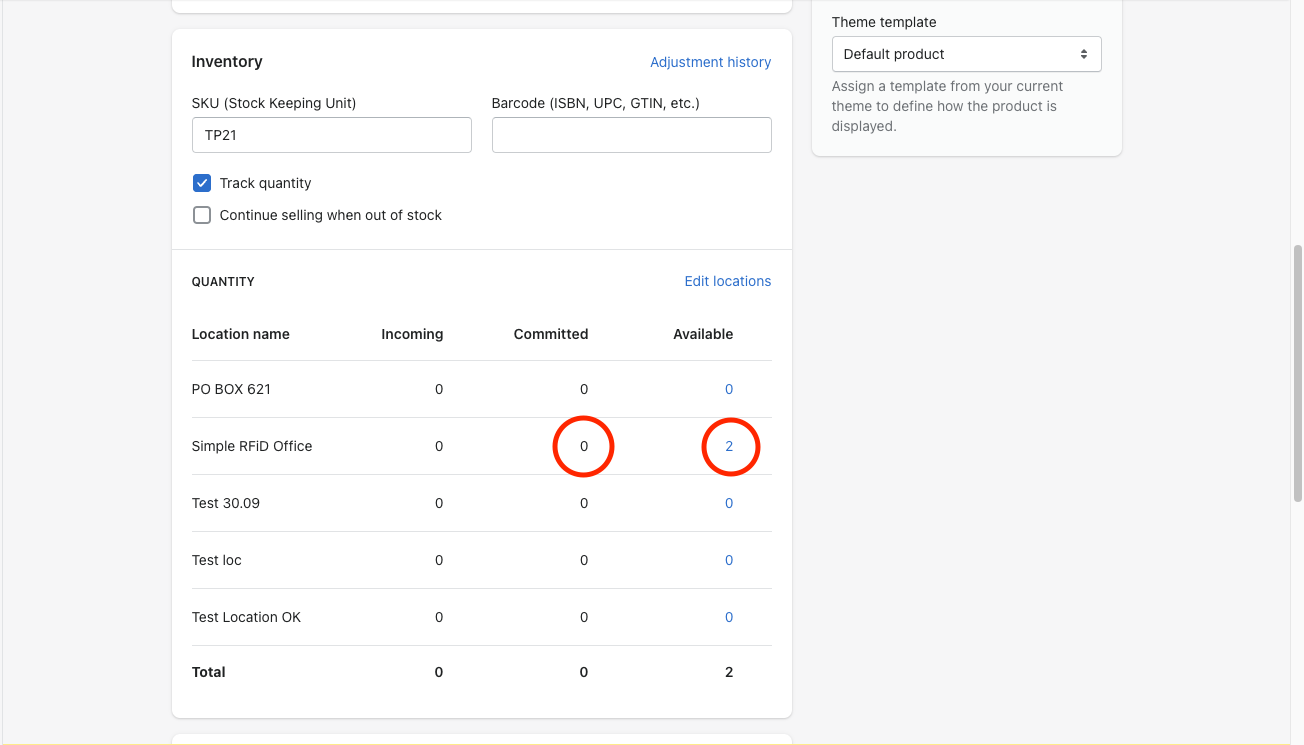
Note that the committed columnbutton on the Shopify products page reflects the number of items ordered but not yet fulfilled. This number is updated once an order is fulfilled for the orders column on the Simple RFID integration app, the orders column reflects the same "committed" value and is updated after the location is synced.
Auto-Sync History
Import Products
Print Labels
To print labels, make sure your Printer and Label are selected at the top of the page; otherwise the Print button will not be clickable.right.
From the Compare On Hand view, for any products where the Shopify inventory exceeds the Projected On Hand quantity (which may be the case when an item on hand does not have an RFID tag), youYou can printalso tagssync directlya product individually by selecting the checkbox next to the product, and pressing the PrintSync button aboveleft of the table.checkbox
ThisYou methodnow isknow especially useful for your initial process of tagging existing inventory; assuming your Shopify counts are fairly accurate, you'll save a lot of time comparedhow to typingcompare quantitiesand manually.
Verifysync Salesproducts Orders
from Simple RFID to Shopify!