# Users

### ****User:****

##### ****Create a User****

If you are a regular user (not manager), please contact your manager and ask to create an account.

##### ****Reset Password****

****1. Go to****<span style="white-space: pre-wrap;"> </span>[Login Page](https://portal.simplerfid.com)  
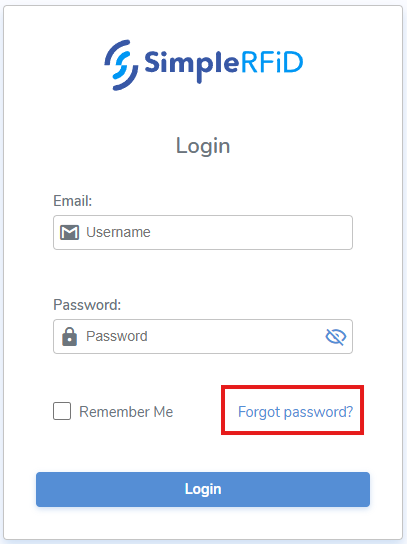
****2. Click**** *"Forgot password?"**  
[![image.png](https://kb.simplerfid.com/uploads/images/gallery/2025-06/scaled-1680-/4skimage.png)](https://kb.simplerfid.com/uploads/images/gallery/2025-06/4skimage.png)
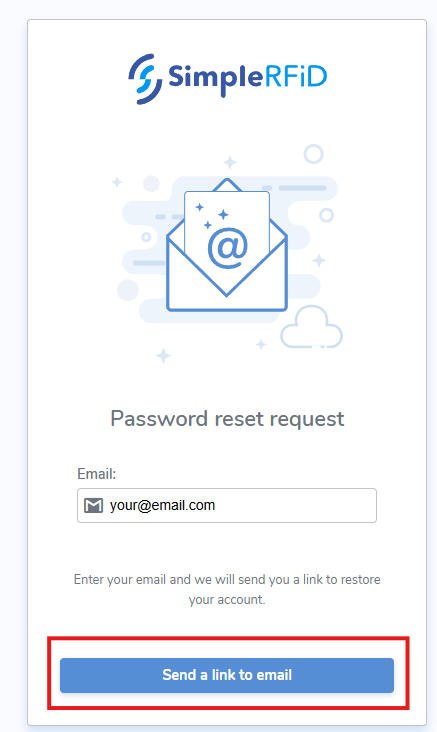
****3. Enter**** **your email**  
****4. Click**** **"Send a link to email"**  
[![image.png](https://kb.simplerfid.com/uploads/images/gallery/2025-06/scaled-1680-/lHdimage.png)](https://kb.simplerfid.com/uploads/images/gallery/2025-06/lHdimage.png)
****5. Open**** **your email inbox**  
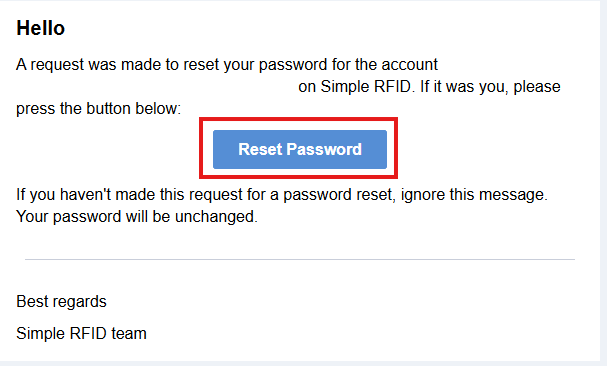
****6. Open**** **noreply** email  
****7. Click**** **"Reset Password"**  
[![image.png](https://kb.simplerfid.com/uploads/images/gallery/2025-06/scaled-1680-/lnjimage.png)](https://kb.simplerfid.com/uploads/images/gallery/2025-06/lnjimage.png)  
****8. Enter**** the **new password**<span style="white-space: pre-wrap;"> twice</span>  
****9. Click**** **"Save new password"**

##### ****Deactivate User****

If you are a regular user (not manager), please contact your manager to deactivate your user.

### ****Manager:****

#####   
****Create a User****

1. ****Go to****<span style="white-space: pre-wrap;"> </span>[Users](https://portal.simplerfid.com/manager/users)<span style="white-space: pre-wrap;"> (logged in as Manager)</span>
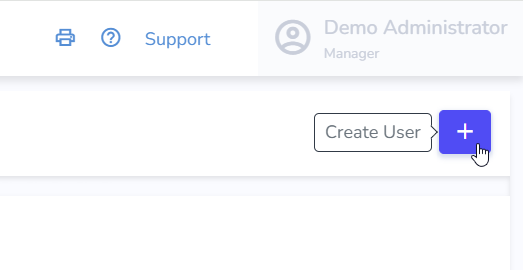
2. ****Click**** the “****+****” button to add a new user.  
    ![Screenshot 2025-01-29 095714](https://s3.amazonaws.com/cdn.freshdesk.com/data/helpdesk/attachments/production/157004723761/original/7U7RDhwkHIy-uR0woULdi39T9eW01CpBug.png?1744209926)
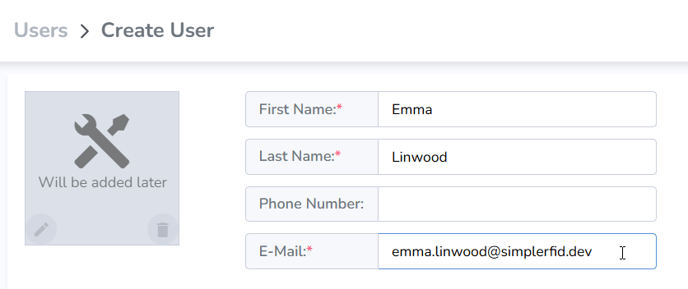
3. ****Enter**** <span style="white-space: pre-wrap;">the user’s </span>****first**** <span style="white-space: pre-wrap;">and </span>****last name****<span style="white-space: pre-wrap;">, </span>****email address****<span style="white-space: pre-wrap;">, and optionally a </span>****phone number****.  
    ![Screenshot 2025-01-29 095824](https://s3.amazonaws.com/cdn.freshdesk.com/data/helpdesk/attachments/production/157004723768/original/PbY3Gd2KsTAtwLEM72T9v8GIfToO5ur_Ag.png?1744209931)
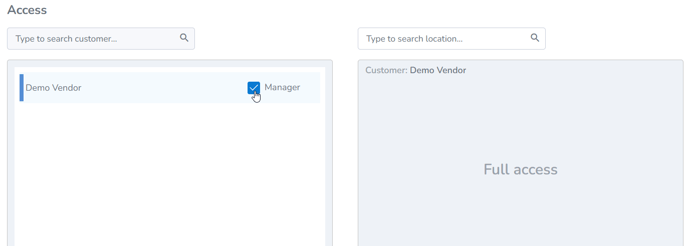
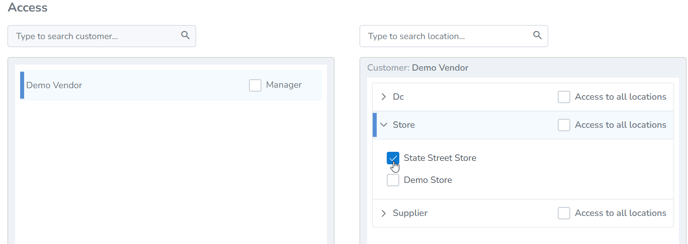
4. ****Select**** <span style="white-space: pre-wrap;">the </span>****locations**** this user will have access to.  
    ![Screenshot 2025-01-29 095839](https://s3.amazonaws.com/cdn.freshdesk.com/data/helpdesk/attachments/production/157004723770/original/hTM7-zX1vyJCOy6b_ywCx5sKJR7o6MOrcA.png?1744209935)

  
****OR****

<span style="white-space: pre-wrap;">4. Give them </span>****Manager**** <span style="white-space: pre-wrap;">access for full access to </span>****all locations****.

![Screenshot 2025-01-29 095829](https://s3.amazonaws.com/cdn.freshdesk.com/data/helpdesk/attachments/production/157004723776/original/afCz5mMlTilh4haG8jBUsVdc9sPFHYQozA.png?1744209940)

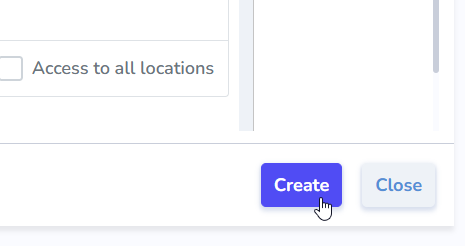
<span style="white-space: pre-wrap;">5. Finally, click </span>****Create****.  
![Screenshot 2025-01-29 101034](https://s3.amazonaws.com/cdn.freshdesk.com/data/helpdesk/attachments/production/157004723783/original/fDx9BQtzQLEL7reeY0Q7beU4Vsofin2G2Q.png?1744209947)

<p class="callout info">The user will then receive an email to set their password and log in.</p>

##### ****Resetting User Password****

Same as User.

****OR****

<span style="white-space: pre-wrap;">1. </span>****Go to****<span style="white-space: pre-wrap;"> </span>[Users list](https://portal.simplerfid.com/manager/users)  
<span style="white-space: pre-wrap;">2. </span>****Click on**** the desired User to open it  
<span style="white-space: pre-wrap;">3. </span>****Click**** **"Reset Password" &gt; "Reset"**

<p class="callout success">A "Reset Password" email should is sent to the user. User will need to Reset the password as above in user's "Reset Password" after step 5.</p>

##### ****Deactivating a User****

<span style="white-space: pre-wrap;">1. </span>****Go to****<span style="white-space: pre-wrap;"> </span>[Users list](https://portal.simplerfid.com/manager/users)  
<span style="white-space: pre-wrap;">2. </span>****Click on**** the desired User to open it  
<span style="white-space: pre-wrap;">3. </span>****Click**** **"Deactivate User" &gt; "Deactivate"**