# Resources
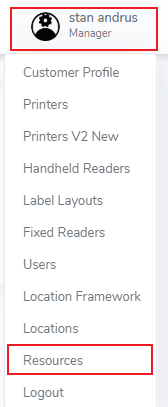
Access the Resources tab by clicking on the Admin menu (top right corner), then select Resources
[](https://kb.simplerfid.com/uploads/images/gallery/2025-05/so5image.png)
##### ****Resources****
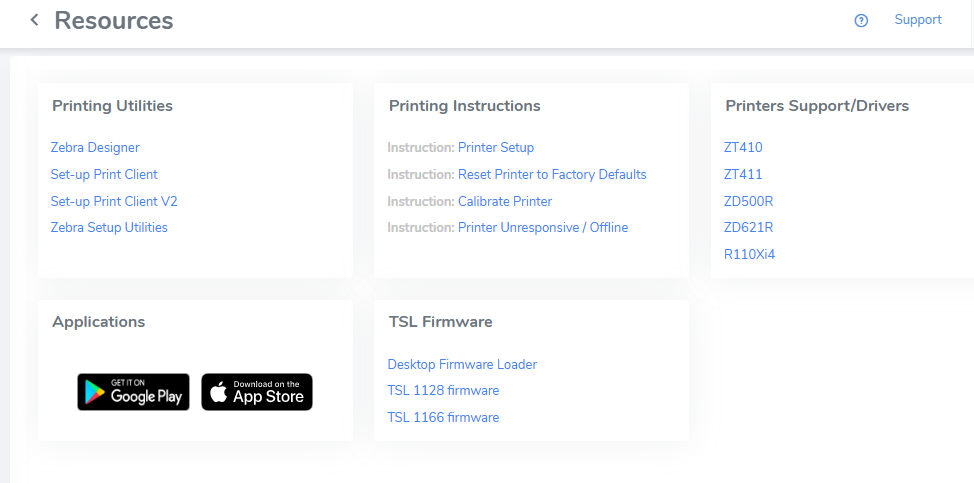
The Resources tab provides important links required for setup and maintenance.
[](https://kb.simplerfid.com/uploads/images/gallery/2025-05/OFMimage.png)
##### The sections include:
##### ****Printing Utilities****
Download the print client and Zebra tools (Zebra Designer & Setup Utilities)
##### ****Printing Instructions****
Instruction on setup, and common issues
##### ****Printers Support/Drivers****
Drivers for various printer models
- MacOS Print Client -
##### ****Applications****
Links to install the mobile app (Play Market & App Store)
##### ****TSL Firmware****
Firmware to update your TSL handheld RFID reader