Menu Bar
The Menu Bar appears before the Admin Menu in the upper right corner of the web portal and contains: Available Printers, Knowledge Base & Support Bot
- Menu Bar: Available Printers
- Menu Bar: Available Printers: Calibrate Printer from Web
- Menu Bar: Available Printers: Printer Profile
- Menu Bar: Knowledge Base
- Coming Soon...
Menu Bar: Available Printers
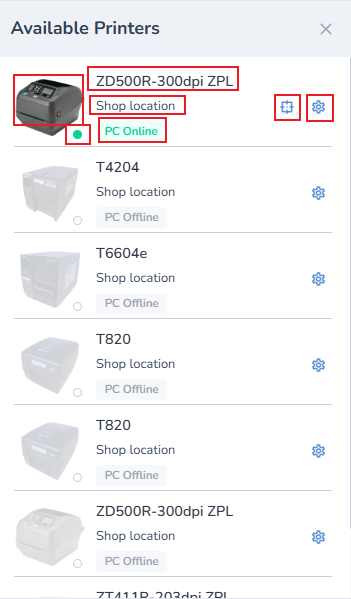
Outline of available printers menu
It includes a list of all available printers
Each printer includes an image, and the make and model of each.
It includes a connectivity indicator if the printer is connected (green dot) or disconnected (outline), and notice if host PC is online or offline.
It includes two buttons: Web Calibration and Printer Profile
Menu Bar: Available Printers: Calibrate Printer from Web

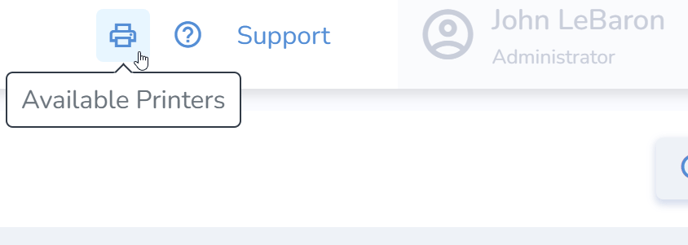
- Access the Available Printers icon at the top-right of the page.
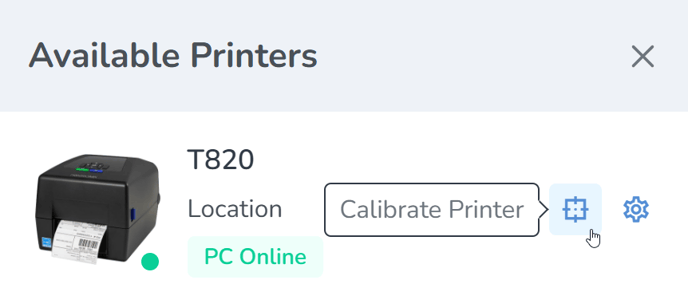
Locate the desired print station and click the Calibrate icon to the right.
Finally, click Calibrate to start the calibration process.
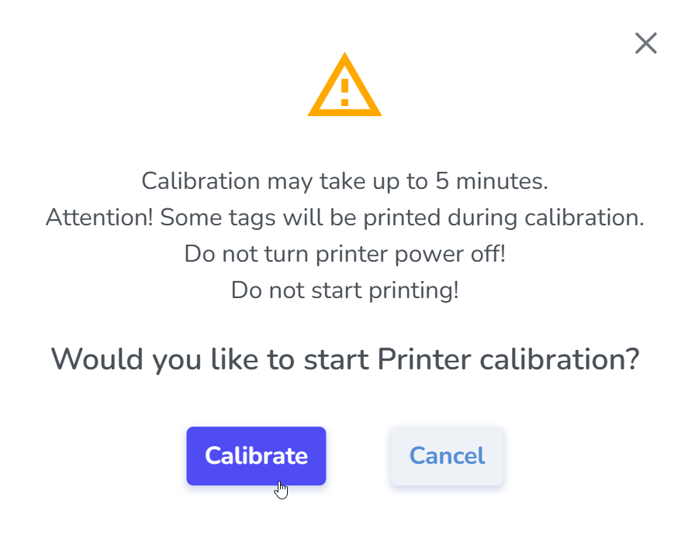
- Accepting this prompt will then send both the media and ribbon and RFID calibrations to the printer, which will proceed automatically with the following steps:
- Media and Ribbon.
- Then a pause for roughly 10 seconds.
- And then the RF calibration, which will take longer; the labels will periodically inch out of the printer for approximately one minute. At the end of the process it will feed out 2 or 3 labels before stopping completely.
- After the calibration has completed:
- Open the printer and roll back the labels so the blank tags may be used—precision is not necessary
- Un-pause the printer
- Now you are ready to print.
If the printer continues to VOID labels, repeat the process. If the issue persists, perform a calibration directly from the printer itself.
Menu Bar: Available Printers: Printer Profile
Menu Bar: Knowledge Base
Coming Soon...
Link to Compare Tool
Link to Onboarding Portal
Support Bot