Web Portal: Resolve & Sync: Complete RFID Tasks
After mismatched products have been reviewed in the Resolution Center, each product may require one or both of the following:
- RFID Actions – RFID-related tasks that must be completed before the Audit is finalized. These actions may include Printing RFID tags, performing an Add Scan, or performing a Remove Scan to bring the RFID inventory into alignment with the verified physical inventory.
- Partner Corrections – Inventory adjustments that update the quantity in the connected partner system (such as Shopify or Apparel Magic) to match the verified inventory count determined during the Audit.
RFID Actions
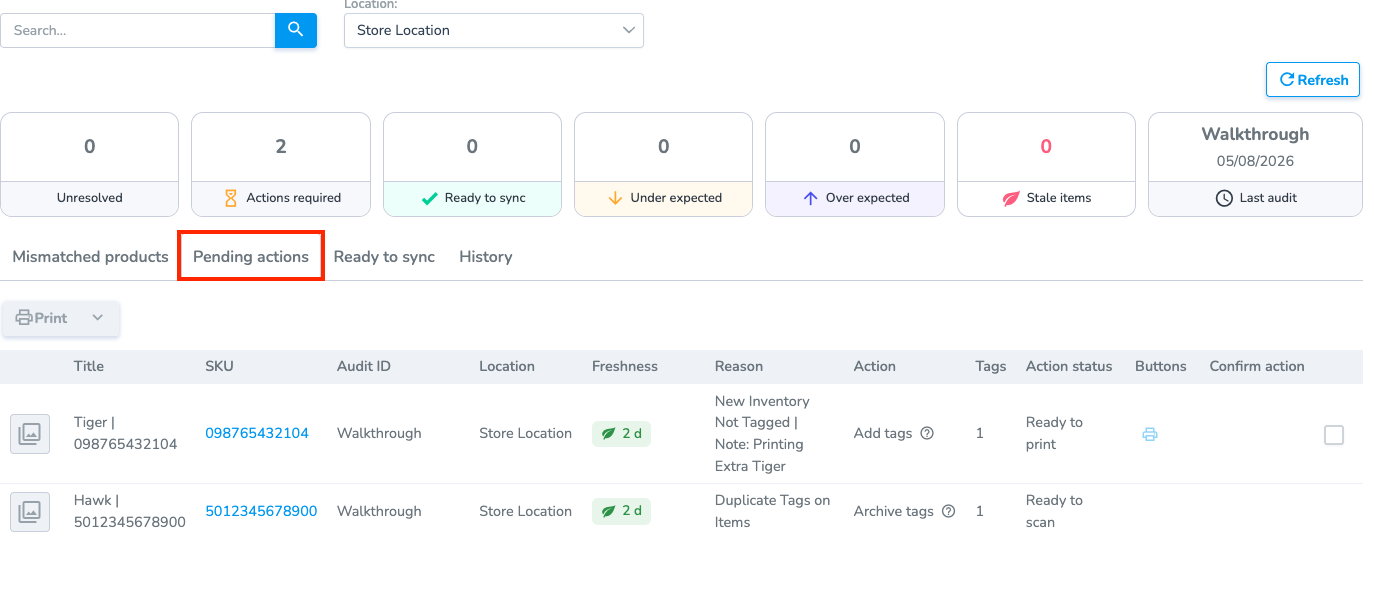
Each Pending Action identifies the RFID operation that must be performed to bring the RFID inventory into alignment with the verified inventory count. To view additional details about a specific action, hover over the ? icon in the Action column.
Pending Actions may include the following:
- Ready to Print – Displays the products and quantities that require new RFID tags to be printed and encoded. If the required print job has already been completed, you can locate the existing print job and associate it with the Pending Action instead of printing the tags again.
- Ready to Scan (Add or Remove) – Displays the products and quantities that require an RFID scan to update the RFID inventory. Depending on the action, you will either:
- Add Scan – Scan RFID tags to add items to the RFID inventory.
- Remove Scan – Scan RFID tags to remove items from the RFID inventory.
Note: To update RFID inventory, use the mobile app to perform Add scans (to increase the RFID count) or Archive scans (to decrease the RFID count). Printing actions must be completed from the Pending Actions page or by the associated print job generated for the action.
Coming Soon: The next version of the mobile app introduces a dedicated Pending Actions tab that consolidates all required RFID actions into one place. Instead of switching between multiple screens, users will be able to view and complete Add, Archive, and print actions from a single workflow. Here's a preview.