# Web Portal: Resolution Center: Complete RFID tasks
After ****Mismatches**** have been reviewed in the ****Resolution Center****, actions are required to align the RFID and Partner Count: ****These RFID tasks**** include ****Printing RFID tags****, performing an ****Add****, or ****Remove (Archive) Scans**** to align the RFID with the partner count.
## RFID tasks
Click on the RFID tasks tab
#### ****Print Missing Tags****
****If the tags have not been printed****
****- Click on the records you wish to print****
****- Click the Print button****
##### ****Associate Already Printed Tags****
****If the tags have already been printed****
****- Click on the records you wish to associate****
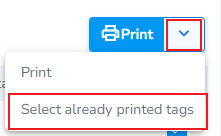
****- Click the chevron, then click Select already printed tags****
#### - [](https://kb.simplerfid.com/uploads/images/gallery/2026-10/Skdimage.png)
---
#### ****Perform Add or Remove (Archive) scans****
****Finally, you will perfor****
****Note:**** To update RFID inventory, use the mobile app to perform ****Add**** scans (to increase the RFID count) or ****Archive**** scans (to decrease the RFID count). Printing actions must be completed from the RFID tasks tab or by the associated print job generated for the action.
****Coming Soon:**** The next version of the mobile app introduces a dedicated ****Pending Actions**** tab that consolidates all required RFID actions into one place. Instead of switching between multiple screens, users will be able to view and complete ****Add****, ****Archive****, and ****print actions**** from a single workflow. [Here's a preview](https://kb.simplerfid.com/books/software-mobile-app/page/mobile-app-rfid-actions-pending-actions).
---