Web Portal: Resolution Center: Complete RFID tasks
After Mismatches have been reviewed in the Resolution Center, actions are required to align the RFID and Partner Count: These RFID tasks include Printing RFID tags, performing an Add, or Remove (Archive) Scans to align the RFID with the partner count.
RFID tasks
Click on the RFID tasks tab

Print Missing Tags
- Click on the records you wish to print
- Click the Print button
Associate Already Printed Tags
- Click on the records you wish to associate
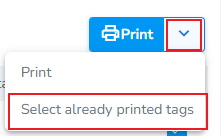
- Click the chevron, then click Select already printed tags
Perform Add or Remove (Archive) scans
Finally, you will perfor
Note: To update RFID inventory, use the mobile app to perform Add scans (to increase the RFID count) or Archive scans (to decrease the RFID count). Printing actions must be completed from the RFID tasks tab or by the associated print job generated for the action.
Coming Soon: The next version of the mobile app introduces a dedicated Pending Actions tab that consolidates all required RFID actions into one place. Instead of switching between multiple screens, users will be able to view and complete Add, Archive, and print actions from a single workflow. Here's a preview.