****Questions about Label Servicing pricing?**** [Learn about pricing, as well as terms & conditions here.](https://kb.simplerfid.com/books/services/page/label-servicing-pricing-terms-conditions)
#### ****Follow these steps to submit Label Servicing jobs directly to the Simple RFID team via the web portal to provide order details****: Log in to the Simple RFID web portal Click on ****Orders**** on the left menu Click "****Purchase****" ****Create Your Purchase Order(s)**** - Purchase Orders can be created [one-at-a-time](https://kb.simplerfid.com/books/web-portal/page/purchase-order#bkmrk-create-purchase-orde-1) or [several orders simultaneously](https://kb.simplerfid.com/books/web-portal/page/create-multiple-orders-using-spreadsheet-upload). - ****Select 'Simple RFID Label Servicing' as the Supplier**** - ****Select the Destination location(s) as the Destination**** - In the ****Customer Notes field**** (top right), enter the ****desired label type****. Click ****Save**** to save the Purchase Order in ****Draft**** status ****Update Order Status**** - ****Open**** the newly created order. - ****Change**** the status from ****Draft → Shipping once finalized.**** ****Notify Simple RFID**** Once your order is submitted, email ****servicing@simplerfid.com**** to let our team know you’ve created a new label servicing request. Please include in your request the order number(s). 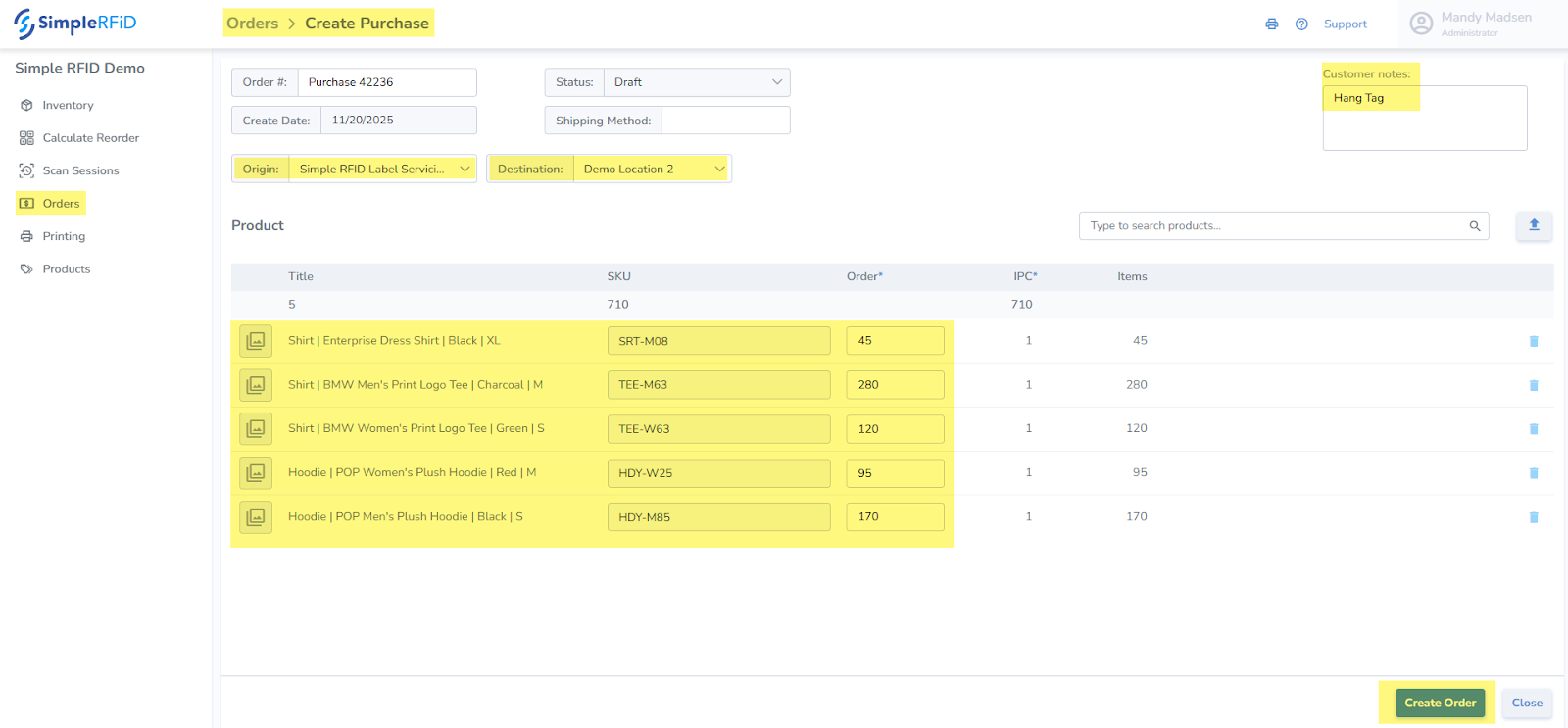 --- ****Prior to Submission Please Ensure the following have been completed:**** ****Simple RFID Label Servicing Profile Created**** This form provides Simple RFID with projections, label type needed, GS1 requirements, etc. This provides you with the Terms & Conditions of the Simple RFID Label Servicing Agreement, and includes pricing & contracts. ****Destination Location(s) Created**** [Create the Location](https://kb.simplerfid.com/books/web-portal/page/locations) in Simple RFID where you wish to have the labels shipped. This is the default location. ****Products Added to Products tab**** Ensure that all products are entered into Simple RFID.If the Products need to be created as GS1 labels, enter the Company Prefix into the Customer Profile tab. If you do not have a Company Prefix and have simply purchased complete UPCs/GTINs, ensure that it is entered into the GTIN & Barcode fields.
--- ##### ****Tracking Job Status**** As the jobs are printed you will have visibility into the jobs, just as if you printed them yourself. Additionally, we verify all label encoding to ensure that all labels scan accurate & complete. Once the Job is moved to Completed you will receive Tracking as soon as the job ships. Please expect 2 week timelines for standard jobs.