# Resolve & Sync

<span style="white-space: pre-wrap;">This article describes the process of resolving inventory count discrepancies and syncing to Shopify after you </span>[perform](https://kb.simplerfid.com/books/auditing/page/audit-shopify)[<span style="white-space: pre-wrap;"> an Audit</span>](https://kb.simplerfid.com/books/auditing/page/audit-shopify).

<p class="callout danger"><span style="white-space: pre-wrap;">This feature is currently only available for customers using our Shopify integration. </span><span style="color: rgb(77, 7, 6); white-space: pre-wrap;">For all other customers, refer to the </span>[Audit &amp; Compare article](https://kb.simplerfid.com/books/scanning-auditing/page/audit-compare)</p>

### ****What is a Resolution?****

 <span style="white-space: pre-wrap;">In Simple RFID, a </span>****Resolution****<span style="white-space: pre-wrap;"> is how we update Shopify's inventory counts to match our scanned counts. Each </span>****Mismatched****<span style="white-space: pre-wrap;"> product needs a </span>****Reason****<span style="white-space: pre-wrap;"> for that mismatch. A </span>****Reason****<span style="white-space: pre-wrap;"> could be missing tags, more products than Shopify expected, etc. Each reason has an </span>****Action****<span style="white-space: pre-wrap;"> attached to it. An </span>****Action****<span style="white-space: pre-wrap;"> could be printing tags, scanning tags, or updating Shopify's inventory count. The </span>****Resolution Center****<span style="white-space: pre-wrap;"> allows you to provide </span>****Reasons****<span style="white-space: pre-wrap;"> and perform </span>****Actions****<span style="white-space: pre-wrap;"> for products that are </span>****Mismatched****.

### ****Access the Resolution Center****

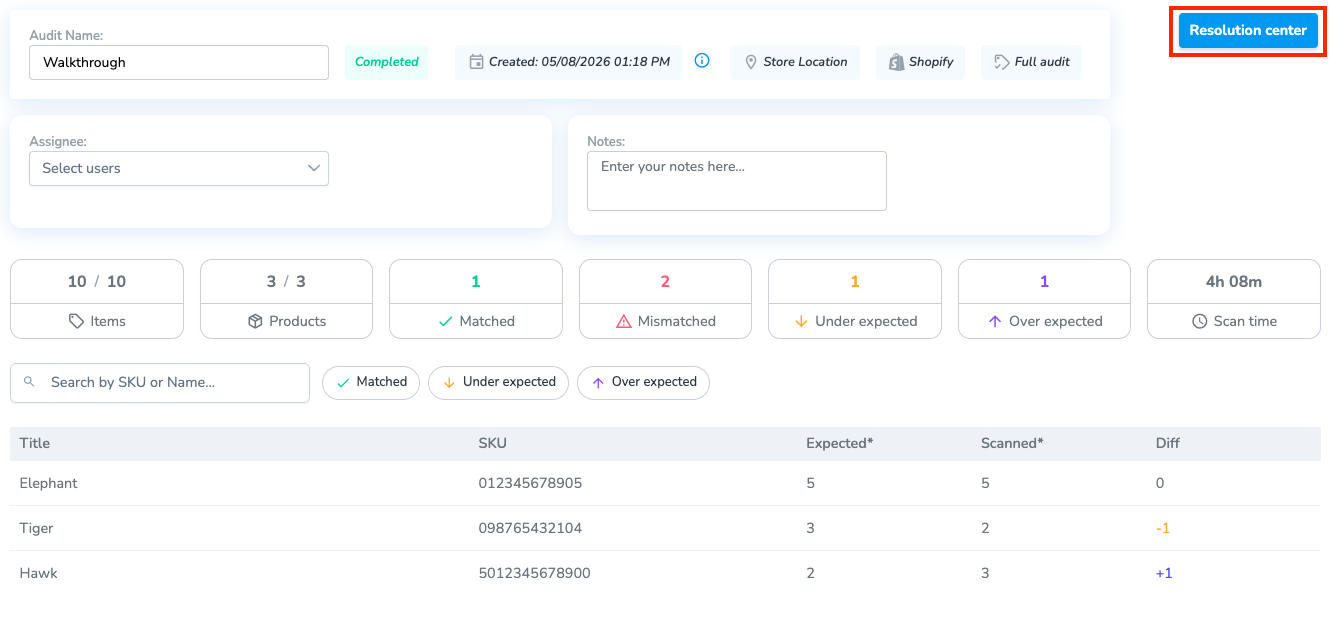
<span style="white-space: pre-wrap;">From an </span>****Audit****<span style="white-space: pre-wrap;">, you can go to the </span>****Resolution Center****<span style="white-space: pre-wrap;">. This is where you can give reasons for specific items being </span>****Over****<span style="white-space: pre-wrap;">- or </span>****Under****-expected.

[![brave_screenshot_portal.simplerfid.com.png](https://kb.simplerfid.com/uploads/images/gallery/2026-05/scaled-1680-/Z9Tbrave-screenshot-portal-simplerfid-com.png)](https://kb.simplerfid.com/uploads/images/gallery/2026-05/Z9Tbrave-screenshot-portal-simplerfid-com.png)

<span style="white-space: pre-wrap;">You can also access this page from the </span>****Resolve &amp; Sync****<span style="white-space: pre-wrap;"> tab in the navigation menu. </span>

### ****Resolve Mismatched Products****

[![image.png](https://kb.simplerfid.com/uploads/images/gallery/2026-05/scaled-1680-/Hptimage.png)](https://kb.simplerfid.com/uploads/images/gallery/2026-05/Hptimage.png)
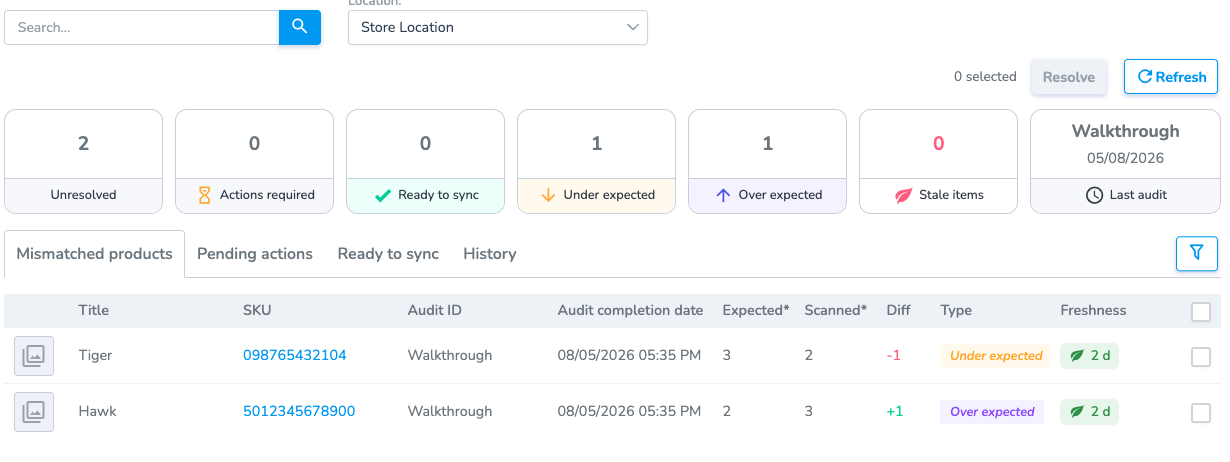
Each product can be in one of three categories:

- ****Mismatched Products:**** <span style="white-space: pre-wrap;">The products are either </span>****Under Expected**** <span style="white-space: pre-wrap;">or </span>****Over Expected****<span style="white-space: pre-wrap;"> without a </span>****Resolution****
- ****Pending Actions:**** <span style="white-space: pre-wrap;">The products are waiting for a specific </span>****Action****<span style="white-space: pre-wrap;"> to be taken (printing, scanning, etc.)</span>
- ****Ready to Sync:****<span style="white-space: pre-wrap;"> The products are waiting to be synced with Shopify</span>

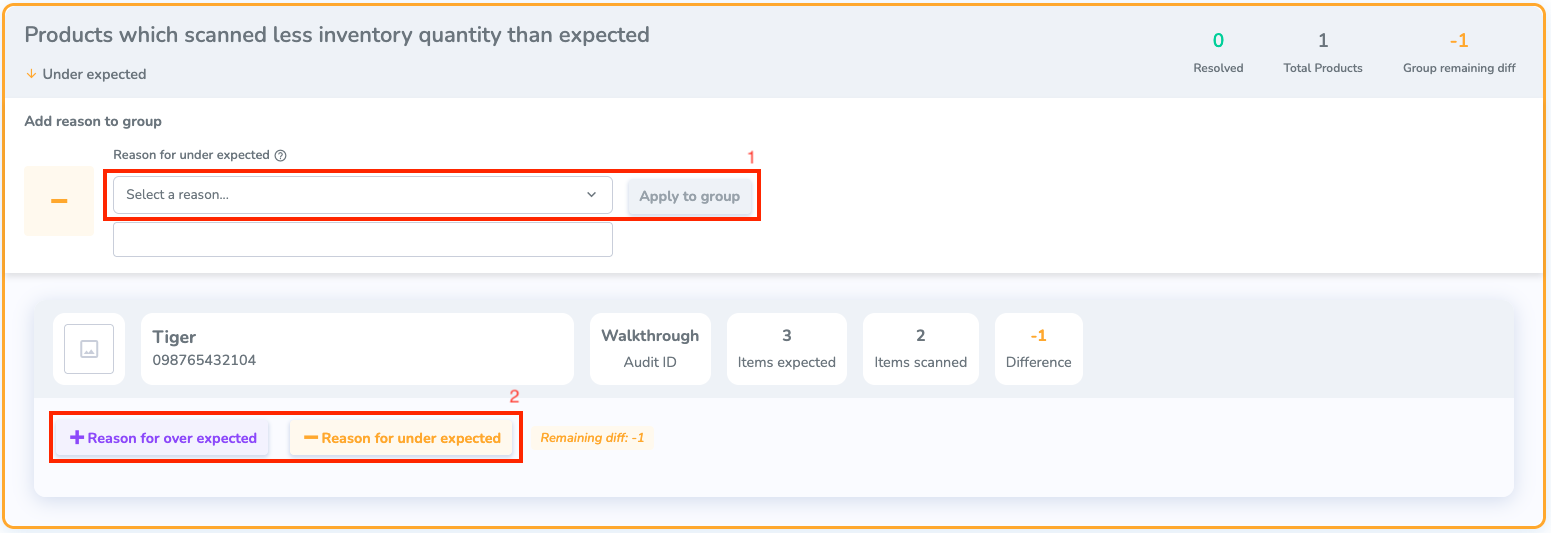
<span style="white-space: pre-wrap;">You can select one or multiple products, and click </span>****Resolve****<span style="white-space: pre-wrap;"> to bring you to the resolution step. There are two groups on this page: </span>****Under Expected****<span style="white-space: pre-wrap;"> and </span>****Over Expected.****

[![brave_screenshot_portal.simplerfid.com (1).png](https://kb.simplerfid.com/uploads/images/gallery/2026-05/scaled-1680-/brave-screenshot-portal-simplerfid-com-1.png)](https://kb.simplerfid.com/uploads/images/gallery/2026-05/brave-screenshot-portal-simplerfid-com-1.png)

<span style="white-space: pre-wrap;">To </span>****Resolve****<span style="white-space: pre-wrap;"> a mismatch, you need to give it a </span>****Reason****<span style="white-space: pre-wrap;">. Depending on the reason you give it, it will require a specific </span>****Action.****

<span style="white-space: pre-wrap;">There are two different ways you can add a </span>****Reason****:

<span style="white-space: pre-wrap;">1. </span>****Group Reason****: Give the same reason for every product selected

<span style="white-space: pre-wrap;">2. </span>****Single Reason****: Give a reason for a specific product

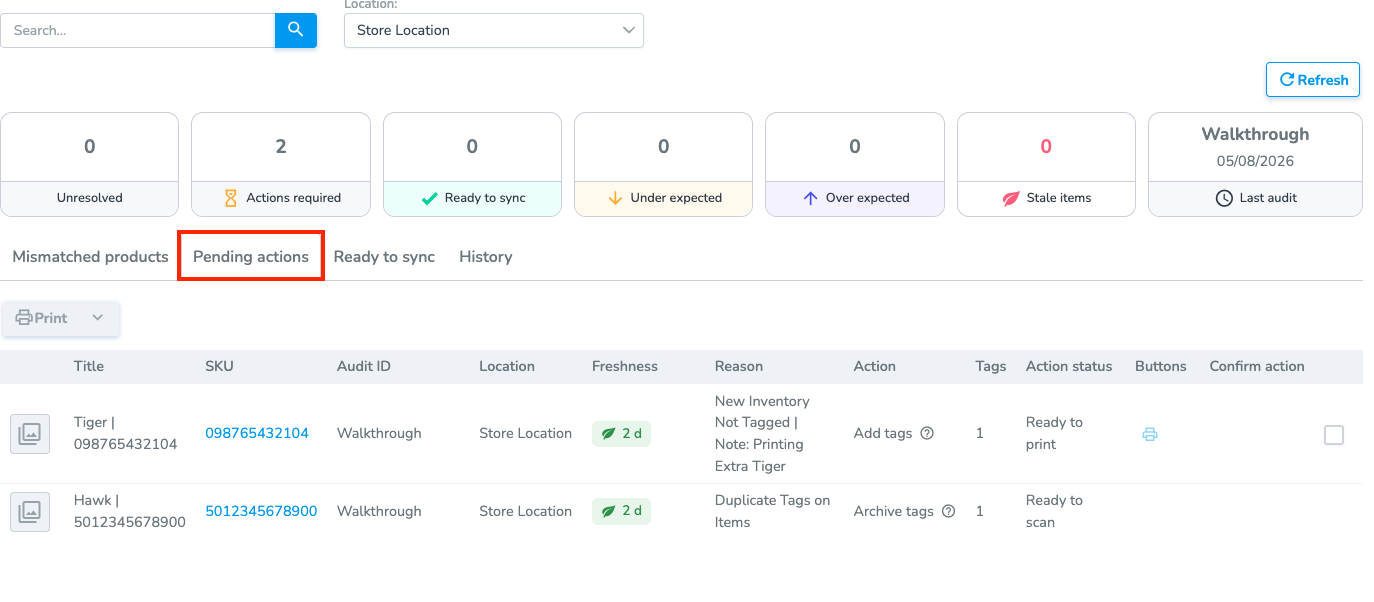
<span style="white-space: pre-wrap;">Once you have selected a </span>****Reason****<span style="white-space: pre-wrap;"> for all of the products, any that require an </span>****Action****<span style="white-space: pre-wrap;"> will be put in the </span>****Pending Actions****<span style="white-space: pre-wrap;"> section in the </span>****Resolve &amp; Sync****<span style="white-space: pre-wrap;"> tab.</span>

[![brave_screenshot_portal.simplerfid.com (2).png](https://kb.simplerfid.com/uploads/images/gallery/2026-05/scaled-1680-/brave-screenshot-portal-simplerfid-com-2.png)](https://kb.simplerfid.com/uploads/images/gallery/2026-05/brave-screenshot-portal-simplerfid-com-2.png)

<p class="callout info">Some Actions can only be resolved on the Simple RFID mobile app. For example, archiving an extra tag.</p>

<span style="white-space: pre-wrap;">From here, you can see the </span>****Action****<span style="white-space: pre-wrap;"> that needs to be taken. You can hover over the </span>****Action****<span style="white-space: pre-wrap;"> column to see what needs to be done. </span>

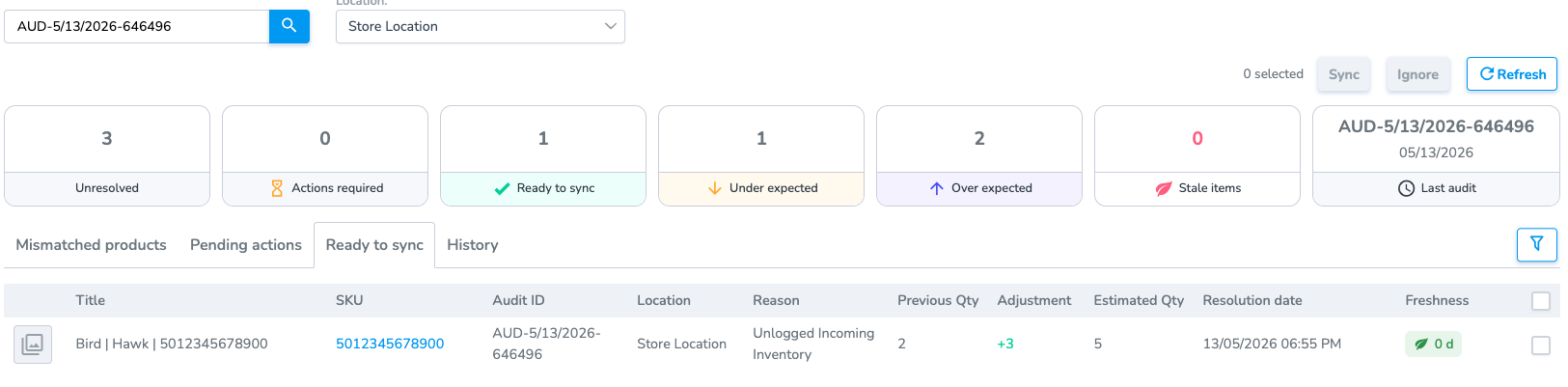
<span style="white-space: pre-wrap;">Any products that need to be synced will be in the </span>****Ready to Sync****<span style="white-space: pre-wrap;"> tab.</span>

[![image.png](https://kb.simplerfid.com/uploads/images/gallery/2026-05/scaled-1680-/th6image.png)](https://kb.simplerfid.com/uploads/images/gallery/2026-05/th6image.png)

<span style="white-space: pre-wrap;">You can </span>****Ignore****<span style="white-space: pre-wrap;"> products; this will remove them from the Resolve page without updating Shopify</span>