# Zebra ZD621R: Alignment
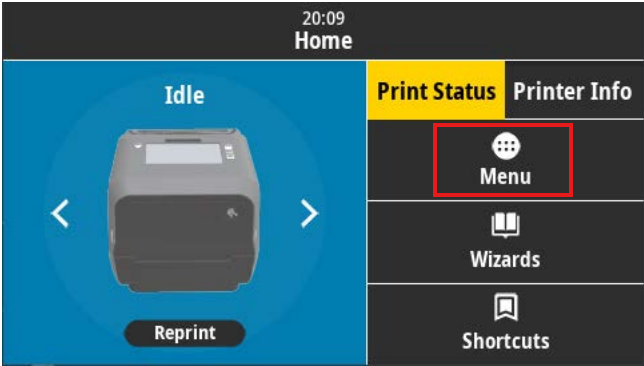
Select ****Menu**** from the home screen
[](https://kb.simplerfid.com/uploads/images/gallery/2025-05/image.png)
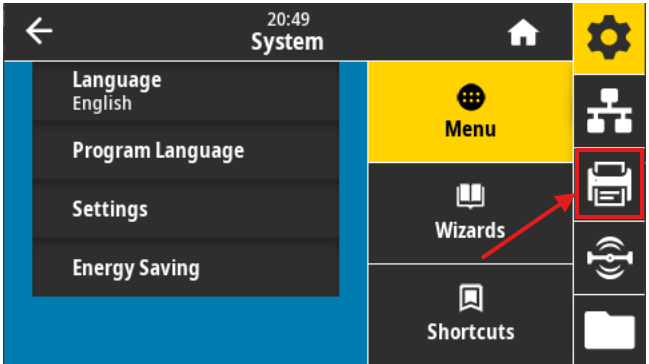
Select the ****Print**** icon
[](https://kb.simplerfid.com/uploads/images/gallery/2025-05/6aqimage.png)
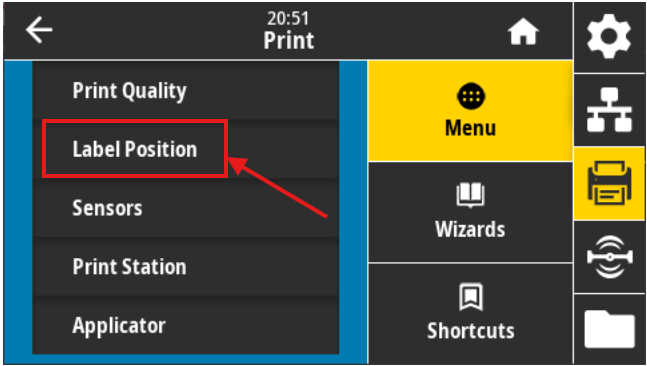
Select ****Label Position/Image Adjust****
[](https://kb.simplerfid.com/uploads/images/gallery/2025-05/OQAimage.png)
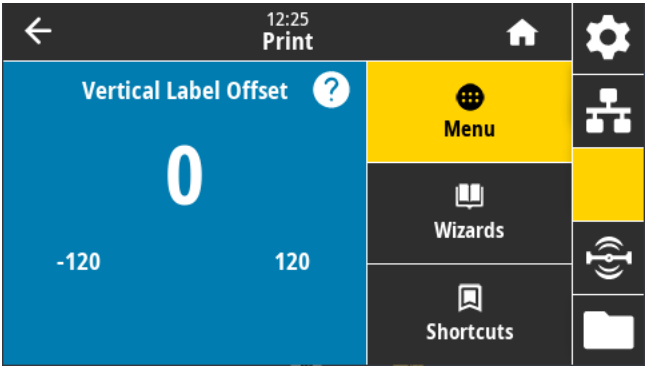
Select ****Vertical Label Offset**** or ****Horizontal Label Offset****
[](https://kb.simplerfid.com/uploads/images/gallery/2025-05/mtEimage.png)
5. ****Adjust**** the value (Accepted values: ****-120**** to ****120****)
****Vertical Label Offset:**** Lower numbers shift everything higher on the label face. Inversely, higher numbers shift everything farther down on the label face, by the specified number of dots.
****Horizontal Label Offset:**** Lower numbers shift everything to the right on the label face. Inversely, higher numbers shift everything to the left on the label face, by the specified number of dots.