# Ship Menu (Sales Orders & Transfers)

From the Ship screen contains the following tools to help locate your order:

- Search
- Status drop-down
- Filter menu

<span style="white-space: pre-wrap;">Below these filters are the orders </span>

[![image.png](https://kb.simplerfid.com/uploads/images/gallery/2025-05/scaled-1680-/Yzrimage.png)](https://kb.simplerfid.com/uploads/images/gallery/2025-05/Yzrimage.png)

##### ****Search**** 

- Click on the search window to lookup a specific order

[![image.png](https://kb.simplerfid.com/uploads/images/gallery/2025-05/scaled-1680-/sx4image.png)](https://kb.simplerfid.com/uploads/images/gallery/2025-05/sx4image.png)

##### ****Status Drop-down****

- Use the Status drop-down to choose a specific status

[![image.png](https://kb.simplerfid.com/uploads/images/gallery/2025-05/scaled-1680-/1PSimage.png)](https://kb.simplerfid.com/uploads/images/gallery/2025-05/1PSimage.png)

<p class="callout info"><span style="white-space: pre-wrap;">You can expand the statuses to include Receive statuses for orders shipping by enabling </span>[Display Receiving Statuses in Ship](https://kb.simplerfid.com/books/mobile-app/page/display-receiving-statuses-in-ship-menu)<span style="white-space: pre-wrap;"> menu from the </span>[Application Settings](https://kb.simplerfid.com/books/mobile-app/page/application-settings)</p>

##### ****Filter Menu****

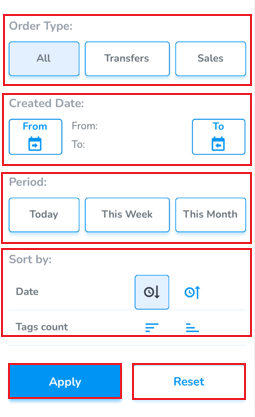
Click on the funnel icon to view the filter menu

- ****Order Type****<span style="white-space: pre-wrap;"> allows to view all order types, or only view Transfers and/or Sales</span>
- ****Created Date****<span style="white-space: pre-wrap;"> allows to choose from and to dates to display orders from a specific timeframe</span>
- ****Period****<span style="white-space: pre-wrap;"> provides quick filters to display today, this week &amp; this month</span>
- ****Sort by****<span style="white-space: pre-wrap;"> allows to sort oldest to newest, and Tags count from largest to smallest</span>
- <span style="white-space: pre-wrap;">Click </span>****Apply****<span style="white-space: pre-wrap;"> to save the settings</span>
- <span style="white-space: pre-wrap;">Click </span>****Reset****<span style="white-space: pre-wrap;"> to remove the saved filter</span>

[![image.png](https://kb.simplerfid.com/uploads/images/gallery/2025-05/scaled-1680-/FI2image.png)](https://kb.simplerfid.com/uploads/images/gallery/2025-05/FI2image.png)