There are two views to scan items: Basic, & Advanced. Enable Advanced tag counting mode in the [Application Settings](https://kb.simplerfid.com/books/mobile-app/page/application-settings)
##### ****Summary Screen**** ****Total Tags**** - This is the total of all statuses ****Active Statuses**** - ****New**** - Tags scanned at the location for the first time, or returning to the location, not yet in inventory - ****Reverified**** - Tags already scanned into inventory in Verified status, which are scanned again - ****Found / Absent**** - This displays the number of Absent Items which have been Found. ****Absent**** tags are items that haven't been scanned since the last Audit. ****Inactive Statuses**** - ****Archived**** - This displays all Archived items scanned. - ****Inactive**** - Products which are moved to Inactive on the Products tab of the web portal - ****Unknown**** - Tags which do not correspond with any Products - ****Draft**** - Items in Draft status. **\*Unknown items are automatically created as Draft Products if "Brand Magic" is enabled from the Web Portal**Items can be moved to Archived via [Archive Scans](https://kb.simplerfid.com/books/mobile-app/page/archive), & verifying [Sales Orders](https://kb.simplerfid.com/books/mobile-app/page/verify-accuracy-of-sales-orders)
****Basic**** Basic is designed for instances where, due to the volume of inventory, the app performance is negatively impacted It groups all tags in ****Active status into one total**** [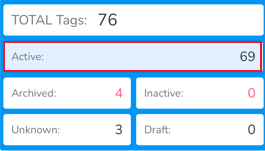](https://kb.simplerfid.com/uploads/images/gallery/2025-05/tlximage.png) As well when uploading [](https://kb.simplerfid.com/uploads/images/gallery/2025-05/kdqimage.png) ****Advanced**** Advanced displays all ****Active statuses separately,**** providing more granular visibility into what is being scanned. [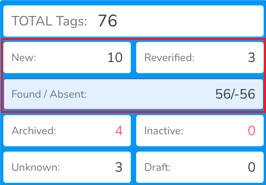](https://kb.simplerfid.com/uploads/images/gallery/2025-05/bLZimage.png) Which allows the option for separate uploading [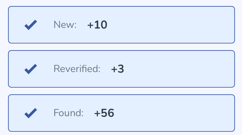](https://kb.simplerfid.com/uploads/images/gallery/2025-05/hvJimage.png) ##### ****Inactive Statuses & Restoring Archived**** ****Inactive statuses**** are included in both Basic & Advanced scans, however only if the items are captured in the scan [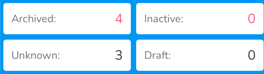](https://kb.simplerfid.com/uploads/images/gallery/2025-05/mM6image.png) From the Upload screen, Archived tags can be [restored](https://kb.simplerfid.com/books/mobile-app/page/restoring-archived-tags) by moving the switcher to 'Restore' [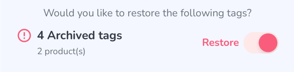](https://kb.simplerfid.com/uploads/images/gallery/2025-05/h0zimage.png)