We have simplified the standard RFID settings to provide better more intuitive controls. If you wish to use the standard RFID reader controls you can enable [Manual Reader Controls (Pro)](https://kb.simplerfid.com/books/mobile-app/page/manual-reader-control) from the [Application Settings](https://kb.simplerfid.com/books/mobile-app/page/application-settings)
Click the r****eader & battery power icon**** in the bottom left corner of the screen to pop-up the ****Scan Settings**** The ****Speed & Density**** settings are designed to optimize scanning for different environments. It is recommended to use ****Speed**** to capture product quickly. When tags are difficult to capture, use ****Density**** To the right of the Speed & Density settings is the [Connected Reader](https://kb.simplerfid.com/books/mobile-app/page/connected-reader) ****Near, Middle & Far**** presets allow to quickly adjust the reader power. Use the Near option to scan items up close and avoid capturing unintended tags. Use Middle for defined tasks such as verifying orders, and use Far whenever Auditing and scanning for accuracy. These presets can be modified from the [Reader Settings](https://kb.simplerfid.com/books/mobile-app/page/reader-settings) To the right of the ****Scan Settings**** button is the ****Auto-Scan**** button which allows the scanner to capture tags without holding the trigger ****Clear**** allows the scan results to be erased ****Finish**** terminates the session [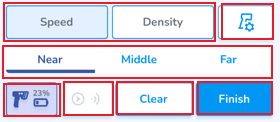](https://kb.simplerfid.com/uploads/images/gallery/2025-05/WDzimage.png)