If you are unable to upload scan data due to poor internet connectivity you can save the results to the device for upload when service is restored
##### ****Save Scans**** At the end of a scan session is the option to ****Save on this device**** [](https://kb.simplerfid.com/uploads/images/gallery/2025-05/neKimage.png) After clicking 'Save on this device' you will see a summary of the scan session and a prompt to Save or Cancel [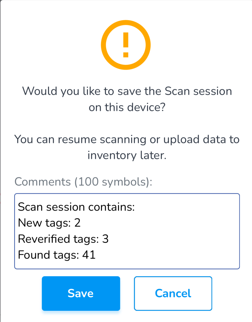](https://kb.simplerfid.com/uploads/images/gallery/2025-05/Ij1image.png) Click ****Save**** A navigation prompt will then appear and ask if you wish to start a new scan session or go to dashboard [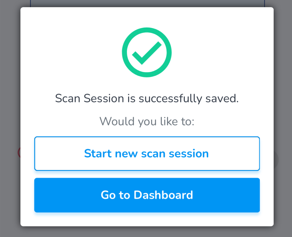](https://kb.simplerfid.com/uploads/images/gallery/2025-05/Bteimage.png) ##### ****Continue a saved scan session**** From the Home screen, click ****Scan**** [](https://kb.simplerfid.com/uploads/images/gallery/2025-05/Ju0image.png) Click ****View saved sessions**** [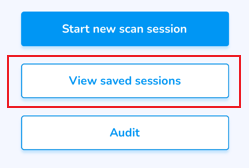](https://kb.simplerfid.com/uploads/images/gallery/2025-05/KBgimage.png) This will display any ****Saved Sessions**** Click on the arrow to open the scan session [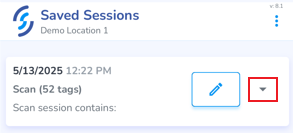](https://kb.simplerfid.com/uploads/images/gallery/2025-05/nuaimage.png) Click ****Continue**** to continue or complete the session Click the ****Pencil icon**** to name the scan Click the ****Trash Can icon**** to delete the scan [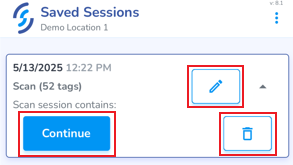](https://kb.simplerfid.com/uploads/images/gallery/2025-05/D5mimage.png)