# Application Settings
The Application settings allows users to enable & disable features & views inside the app
****Scan & Archive****
[](https://kb.simplerfid.com/uploads/images/gallery/2025-05/Iimimage.png)
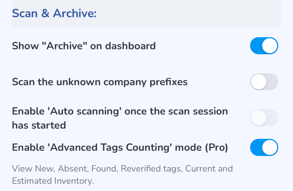
- Enable to display the "[Archive](https://kb.simplerfid.com/books/mobile-app/page/archive)" option. If this option is disabled the user will not see this option.
- Scan the unknown company prefixes. Enabling this option will allow the reader to capture tags not associated with your account
- Enable the "Auto-scanning" once the scan session has started. This option is not yet available for use.
- Enable "Advanced Tags Counting" mode (Pro)
****Ship****
[](https://kb.simplerfid.com/uploads/images/gallery/2025-05/QrXimage.png)
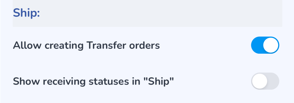
- Enable if you wish to create Transfer orders from the app
- Enable if you wish to view the receiving statuses in the Ship menu
****Product View****
[](https://kb.simplerfid.com/uploads/images/gallery/2025-05/Jqnimage.png)
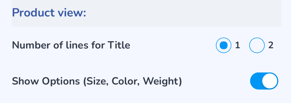
- Number of lines for Title can be adjusted from 1 to 2
- Show Options (Size, Color, Weight) displays the Variant properties
****Reader Control****
[](https://kb.simplerfid.com/uploads/images/gallery/2025-05/rhZimage.png)
- Enable [manual Reader Control (Pro)](https://kb.simplerfid.com/books/mobile-app/page/manual-reader-control) restores the original reader controls, and instead of Speed & Distance, the user can adjust the Scan Modes & Sessions. Instead of the preset power options of Near, Middle & Far, the reader power is a slider
****Search Tags****
[](https://kb.simplerfid.com/uploads/images/gallery/2025-05/ep4image.png)
- If tags aren't able to be searched it may be due to the filter value. Enabling this allows searching for tags containing any filter value
****Actions****
[](https://kb.simplerfid.com/uploads/images/gallery/2025-05/AcHimage.png)
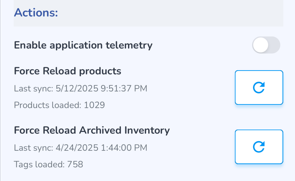
- Enable the application telemetry to provide additional details in logs sent to Support
- If, when scanning items, the product details (photos, name, size, etc.) do not appear, click this to reimport products
- If when scanning items, Archived inventory does not load, click this to reload Archived Inventory