# Clubessential | Import Inventory Report
### Download Inventory Report from Simple RFID
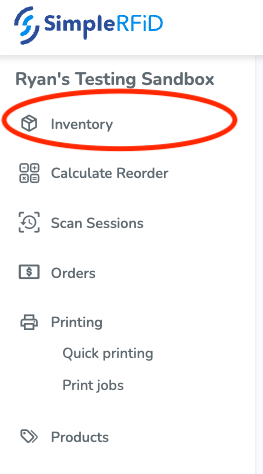
##### On the [Simple RFID Web Portal](https://portal.simplerfid.com/), navigate to the ****Inventory**** page
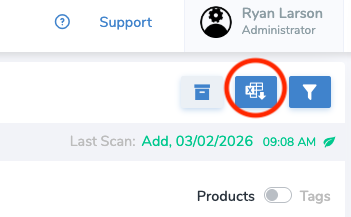
##### On the top right of the page, select the ****Reports**** button
[](https://kb.simplerfid.com/uploads/images/gallery/2026-03/9sUbrave-screenshot-web-simplerfid-com.png)
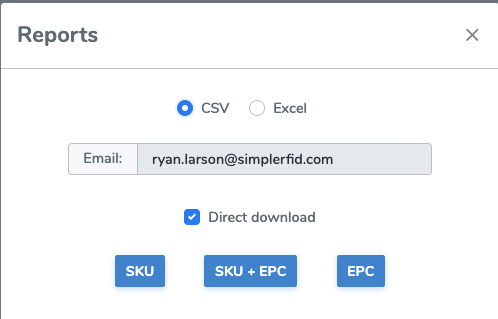
##### Select ****CSV**** and ****SKU****. This will download a report in your default download location. It will have the extension ****.csv****
[](https://kb.simplerfid.com/uploads/images/gallery/2026-03/image.png)
### Format Report for Clubessential
##### Open the downloaded report in a spreadsheet program such as Excel
##### Delete the ****Name**** column
##### Rename the ****Total**** column to ****Counted Quantity****
[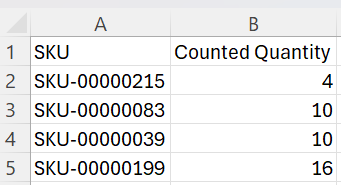](https://kb.simplerfid.com/uploads/images/gallery/2026-03/wOlimage.png)
If your unique identifier is the UPC, you will need to rename the ****SKU**** column to ****UPC**** and select the ****UPC**** column and make them ****Numbers****.
### Import into Clubessential
##### On Clubessential, navigate to ****Items**** then ****Inventory Count Wizard****
##### Select ****Import Counts from Scanning Device (\*.csv)****
##### Upload the CSV file that you formatted
You will need to lock the count sheet prior to uploading