If using wax ribbon, we recommend your darkness is set between 0 and 5.
If using resin ribbon, we recommend your darkness is set between 10 and 15.
Press the green ****Pause**** button on your printer to open the main menu. Use the physical navigation keys to navigate to ****Settings > Media > Image > Print Intensity**** [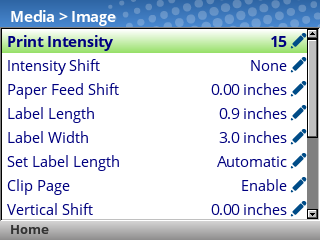](https://kb.simplerfid.com/uploads/images/gallery/2026-09/17.png) Press the ****Enter**** key, and use the ****Up**** and ****Down**** arrow keys to adjust the value. If you see the ****ENTER SWITCH LOCKED**** message, just press the ****Up**** and ****Down**** arrow keys at the same time, and you should then see ****ENTER SWITCH UNLOCKED****. Press ****Enter**** again to apply your settings, then unpause the printer and choose ****Save Permanently in Active Config.****Keep in mind that print quality/darkness is also affected by the Print Speed. The slower the Print Speed, the less energy is needed to transfer the ink; so the Print Intensity should also be lowered accordingly.