****NOTE:**** The values you see here will not necessarily be the values you need to set.
[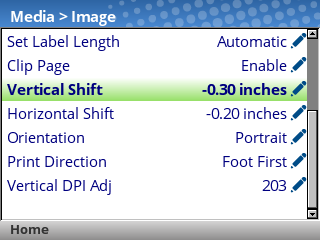](https://kb.simplerfid.com/uploads/images/gallery/2026-09/16.png) Adjust the values for these settings according to your needs. - Vertical Shift: ****Positive values**** will shift the image ****up,**** and ****negative values**** will shift the image ****down.**** - Horizontal Shift: ****Positive values**** will shift the image to the ****left,**** and ****negative values**** will shift the image to the ****right.**** - If you encounter the message ****ENTER SWITCH LOCKED****, press the Up and Down arrow keys together, then wait until the screen says ****ENTER SWITCH UNLOCKED****. You will then be able to edit these settings. When you've adjusted these settings ****unpause**** the printer using the green Pause button, then select ****Save permanently in Active Config**** ### Step 2: Try printing another label, and see if any further adjustments are necessary.After adjusting these settings, the printer will feed a few labels before printing again. This is expected behavior.