Printronix: Alignment
Step 1:
Pause your printer using the green Pause button
Using the arrow and enter keys, navigate to Settings > Media > Image and locate the Vertical Shift and Horizontal Shift settings:
NOTE: The values you see here will not necessarily be the values you need to set.
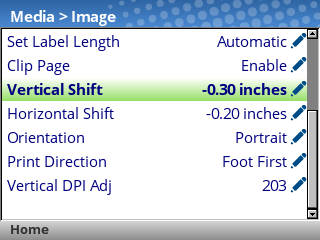
Adjust the values for these settings according to your needs.
- Vertical Shift: Positive values will shift the image up, and negative values will shift the image down.
- Horizontal Shift: Positive values will shift the image to the left, and negative values will shift the image to the right.
- If you encounter the message ENTER SWITCH LOCKED, press the Up and Down arrow keys together, then wait until the screen says ENTER SWITCH UNLOCKED. You will then be able to edit these settings.
When you've adjusted these settings unpause the printer using the green Pause button, then select Save permanently in Active Config
Step 2:
Try printing another label, and see if any further adjustments are necessary.
After adjusting these settings, the printer will feed a few labels before printing again. This is expected behavior.